Posts

Migration Automation Tool: Migrate Google Analytics GA3 / Universal Analytics(UA) to GA4 using Google Tag Manager

Image
Here is POC on Migrating GA3 / Universal Analytics to GA4 using Google Tag Manager. Demo Covers: Creation of GTM Account, Container and Workspace for tags  Adding GTM codes to webpages and enabling GTM Universal Analytics Property Creation in GA GTM UA / GA3 Pageview tag creation GA3 Event tag creation by capturing CSS selector for the button event trigger GA4 Property Creation and linking via GA Enabling GA4 pageview tag  Using GTM GA4 migrator tool to migrate GA3/UA event tags to GA4 Scanning though the GA4 event migration Validation using GTM debug mode Report validation

Migration Automation Tool: Migrate Google Analytics GA3 / Universal Analytics(UA) to GA4 using Google Tag Manager

Image
Here is POC on Migrating GA3 / Universal Analytics to GA4 using Google Tag Manager. Demo Covers: Creation of GTM Account, Container and Workspace for tags  Adding GTM codes to webpages and enabling GTM Universal Analytics Property Creation in GA GTM UA / GA3 Pageview tag creation GA3 Event tag creation by capturing CSS selector for the button event trigger GA4 Property Creation and linking via GA Enabling GA4 pageview tag  Using GTM GA4 migrator tool to migrate GA3/UA event tags to GA4 Scanning though the GA4 event migration Validation using GTM debug mode Report validation

Event Driven Data Layer Implementation using ACDL/GTM - Create Own EDDL Strategy

Image
Data Layer is a known concept for most in digital analytics. As the name suggests it is all about data residing in the layer of the pages. Data can be about useful information of your properties when the user interacts using which analytics and marketing folks understand the likes and wants of users to create an enriching experience for the users. Capturing the data useful for your properties is the foundation to begin knowing anything about your users preferences to provide compelling user experiences that flourish your business. Designing a robust data layer should the number one priority to take the right path to success. Most of us have heard about Customer Experience Digital Data Layer layer by W3C and would have worked on designing data layer to collect data footprints of the users.  One of the main challenges in tracking in SPA / regular pages is users moving to next page or bouncing off the pages. Tracking Interactions happening on a page without the need to refresh the pag...

Adobe Experience Platform Architecture

Image
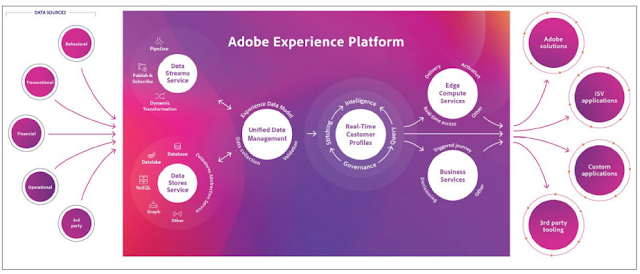
Experience Platform is built on open APIs and supports the easy integration of enterprise solutions using familiar tools. Experience Platform also supports partners to build and integrate their own products and technologies as needed.  Experience Platform is designed and built using the following core principles of API-first development:  • The API is the primary interface into Experience Platform.  • All Experience Platform functions, including administrative functions, are available through the API.  • Platform services, Adobe solutions, and third-party integrations use the same API. By taking an API-first approach, Experience Platform opens integration opportunities such as: Enabling partners to build their own data ingestion and egress capabilities, including 24-hour automated processes, by using Catalog and Data Access services for full integration capabilities with the data store in Experience Platform.  • Enabling developersto build custom UIsto support s...

Learn Adobe Analytics Marketing Reports & Analytics (SiteCatalyst) : Free Self Implementation Kit for Study

Here is the Adobe® Analytics marketing reports & analytics (SiteCatalyst) self Implementation kit to practice & learn - http://ats.adobe.com/jjsite/implementation_training.php /. There is no sandbox login, but you can see SiteCatalyst beacon firing up using browser debugger. SiteCatalyst Implementation Guide: https://marketing.adobe.com/resources/help/en_US/sc/implement/sc_variables.html Best Buy: http://www.amazon.com/Adobe-SiteCatalyst-Handbook-Insiders-Guide/dp/032185991X?tag=viglink122547-20

As the testing industry grows and matures, more testers will likely:

But before the testing industry can really prove its worth, more testers will need to know  why  they’re testing -- before they start running tests. To answer “why", you must first formulate a sound hypothesis. Your hypothesis needs to get to the core of what you’re trying to achieve through testing. Testers who start with solid hypotheses have better odds of running valid tests with significant results. Valid tests can lead to big conversion gains. Big conversion gains can equate to big revenue increases. And, of course, big revenue increases mean your company’s doing well. The rest is a no-brainer. If you’re helping your company profit, you might just get that bonus, after all!

Segmentation, personalization, and dynamic content tests

Segmentation, personalization, and dynamic content tests are different words used to describe the same testing technique? Segmentation, personalization, and dynamic content tests are similar to each other. But they are not exactly the same. Each test method differs in how it works, what it looks at, and how it’s run. Segmentation and personalization tests can be thought of as running along the same continuum. But they are different. Segmentation tests play off the idea that not every visitor coming to your site is the same. Visitors are coming from different devices, locations, and may even speak different languages. WhichTestWon’s State of Online Testing Report found 12% more segmentation tests were run this year, compared to last year. That’s an impressive gain that shows the testing industry is maturing. Personalization tests take individual visitor segments -- like device used, or language spoken, or even 'affluent dog owners in the market for a late-model Toyota' -- to ...

Which testing practice is usually considered advanced or sophisticated?

Currently, some of the most complex tests to run are segmentation, personalization, and dynamic content tests. These tests require a deep understanding of who your audience is, where and how your traffic is arriving, and what your viewers require. Unsure what the other test techniques are? Here’s an explanation: A/A, A/B, or A/B/N tests are just a fancy name for the plain, old split test.  •    An A/A test splits traffic 50/50 and tests the exact same thing against itself. A/A tests are usually implemented before A/B testing to make sure test results will be valid. •    A/B, or traditional split testing, occurs when you split traffic 50/50 and compare version A to version B to see which converts better. •    A/B/N testing occurs when you compare any number (N) of versions against each other to determine which converts best. Sequential testing is different than split testing. It occurs when you test one element, then another, and compare...

Few testers look far down the conversion funnel because doing so

Testing further down the funnel requires sophistication and a mature, practiced testing approach. While there’s still much room for improvement, WhichTestWon’s 2015 State of Online Testing report shows the testing industry is heading in the right direction.  This year, more testers than ever before ran highly sophisticated tests. They also used more advanced testing and measurement techniques. Curious what we mean by “sophisticated” tests and techniques? Try your luck at the next few questions to find out.

Measuring conversion rates on “thank you” pages provides?

Harnessing the power of ‘thank you’ is important. It’s also often overlooked.  Testers tend to get so wrapped up generating leads and sales, they forget to test the receipt / thank you page. But testing this last step in the sales funnel offers a golden opportunity. That’s because roughly 40% of traffic landing on your thank you page will convert again for something else.  Take advantage of this high conversion rate by testing ways to bring your customers back – again and again. When testing thank  you pages, make sure to think about your audience. Find ways to cater to both first-time and return visitors. Both have different needs. Consider testing different offers for each group to keep them coming back. Test  your thank you emails, too. Did you know new customer thank you emails have the highest open rate of any message you’ll ever send? That’s an insane amount of attention you’ll never get from your customers again. Test ways to extend conversion...

Creating exit offers causes friction and does little to improve conversions

Creating exit offers makes it difficult for your customers to leave without a conversion of some type. Exit offers might come in the form of an animated pop-up, a special offer, or something else that keeps visitors on your site longer. Yes, creating exit offers can create annoyance. But, when done correctly, they can also be highly beneficial. In this award-winning real-life test, using  an exit offer increased conversions an astounding 473%! Use exit offers to your advantage. Test new techniques and ways to create it.  Whatever you do, don’t let prospective customers easily leave without trying to get at least a micro-conversion from them.​

What is the biggest roadblock preventing shoppers from making a purchase?

Most customers don’t want to take the time to create / register an account. Or, if they’re returning customers, they might not remember the email or password used to register. Consider testing removing, or at least simplifying, the registration process.  HOWEVER. . . if you do NEED visitors to register, test for savvy ways to make the registration process more appealing. In this real-life test, The Honest Company tested a takeover-style registration form versus a pop-up registration form. The more appealing takeover-style registration form (Version A) increased membership registrations 15.4% over the homepage/overlay version.  

What percent of shoppers are likely to abandon an ecommerce site at the checkout page?

Research shows, on average, about 70% of shoppers will abandon your site at checkout.  This statistic means for every 100 shoppers adding something to their cart, only about 30 will actually go through with the final purchase. The other 70 will leave without buying anything! Shopping cart abandonment is one of the worst curses of ecommerce. The good news is that there is a remedy: testing! If you test ways to improve your checkout process, you can hugely improve your bottom line and online sales.

Flipkart's Adobe Analytics Tracking and "Whats Missing"

Image
Flipkart uses an s_code version lesser than h.25.3 code and fails to take advantage of first party cookie (s_fid) set by js code while using a third party cookie. Paying huge sum to Adobe and failing to take advantage of this fall back method :-(  in an online world which experiences a higher rejection rate for third party cookies ????? Adobe used user agent and IP address to track the user while s_vi cannot be SET in version lesses than H.23.5 which only means many people in a single network is treated as one visitor :-( Why on earth do you want to track your visitor statistics in such a way!!!!

Automated dashboard building tip using Adobe Analytics Report Builder!

Image
Preserving the required metrics/dimensions in a certain order while creating reports using Report Builder, and saving the templates by naming it properly is the key to build automated dashboards. Keep the raw the data in one sheet (don't forget to set the preserved order), and the formatted one in other (just apply the formula once - connect the data with charts). Every time you refresh the report with a different date range or different RSIDs due to preserved order set in the raw data sheet, the formulas applied in the formatted sheet connecting the raw data works superbly.

YouTube Embedded Video Tracking using Adobe Analytics (SiteCatalyst) - Download Codes here

Image
YouTube Embedded video tracking with any analytical tools require bit of code to be added - first, to bring the video details out of the iframe over an API - second configure Adobe Analytics media module milestone tracking in AppMeasurment.js (configure video reporting in RSID) - That's it!!!! Download the full set of ready-made codes here in a folder, open one of the html file in a browser, put the debugger on, play with the video + watch the image request firing up for the actions made on the video  smile emoticon Pack contains  - Configured AppMeasurement.js - Single YouTube Video tracking (HTML) - Multiple YouTube Video tracking (HTML) https://gist.github.com/KamalChembath/00106eb266c91777c32e

Linear Allocation (visit based) and Exaggerated Numbers while using Calculated Metrics - Exact Reason

Image
Adobe Analytics// Issue with calculated metrics!!! Wrong calculation when one of the value used in the calculation is zero. For example: Whenever the order value is zero and revenue has some value, the AOV calculated metrics divides revenue/orders. Ideally the output should be zero; it throws up wrong value here. I saw this across Client RSIDs; whenever the order value is zero and revenue has some numbers, the value is calculated wrongly. Need help! Screen Shot 2015-04-12 at 7.28.07 pm.png     REPLY 0 | QUOTE REPLY | UNSUBSCRIBE | EDIT | DELETE Answers 02:19  PM Brian Au ...in reply to Kamal Chembath April 10, 2015 Hi Kamal, Standard metric attribution for the Site Content> Pages report is linear therefore (see reference info linked below) even though it appears the Orders metric is 0 in the report it actually is a small fraction. Therefore when the calcu...